7. Extensions, shop and furniture packs
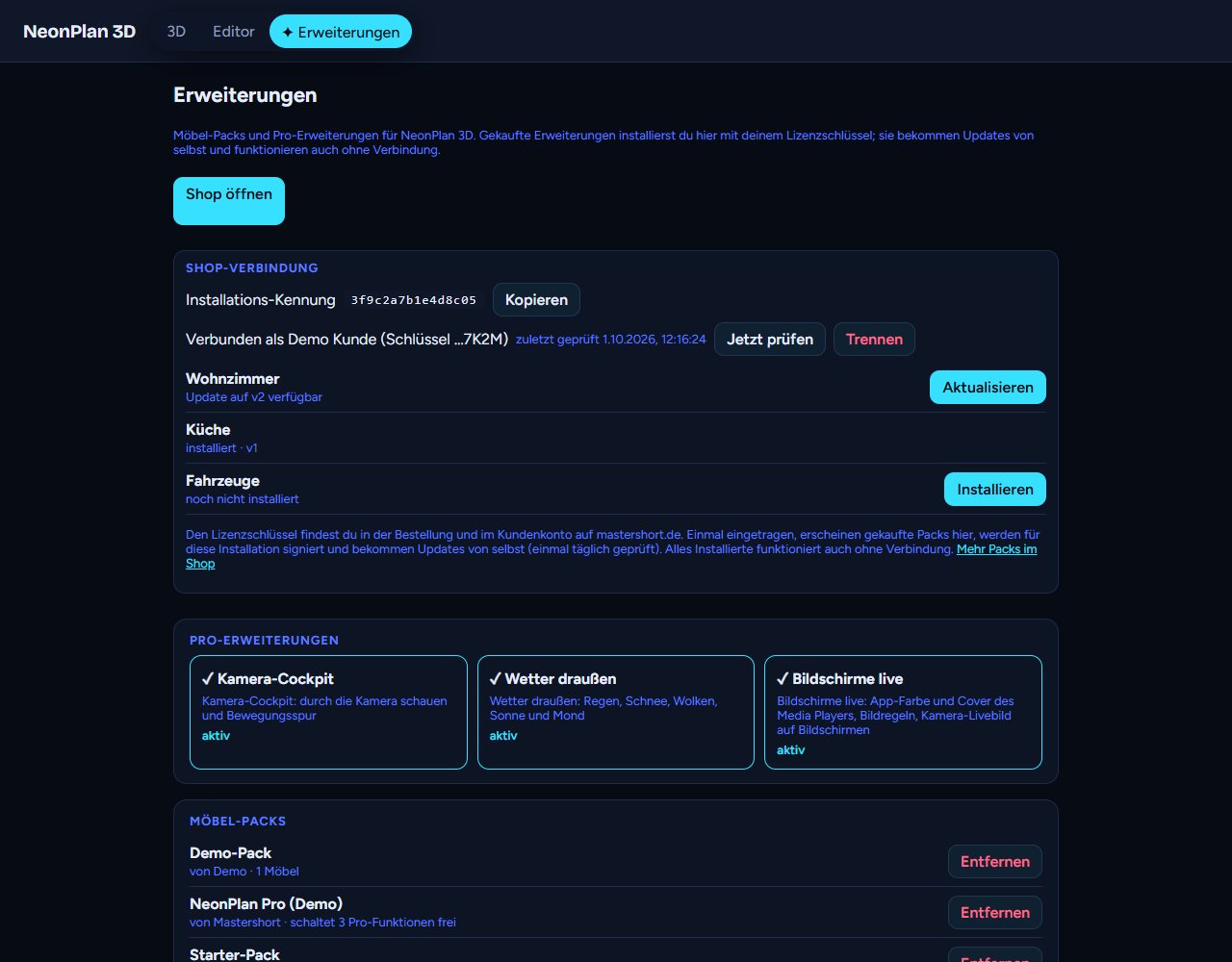
The ✦ Extensions tab gathers everything you can add to NeonPlan 3D.
7.1 Shop connection
With your first purchase at mastershort.de you get a licence key in the form NP-XXXX-XXXX-XXXX-XXXX. It is in the order e-mail and in your customer account.
- Open Extensions.
- Enter the key under Shop connection and press Activate.
- Your purchases appear with Install. A tap fetches the pack from the shop, signed for exactly this installation.
After that:
- Updates come by themselves. Once a day NeonPlan 3D asks whether there are new purchases or newer versions and installs them. Check now asks right away.
- Everything keeps working offline. Installed packs are checked locally, the shop is never needed for that.
- Disconnect removes the key. Installed packs stay.
Several installations: A key is connected to at most three installations at a time. If you move to new hardware, simply connect the new installation, the oldest one then drops out. Up to five new connections are possible per year. The Installation id at the top is an anonymous fingerprint of your installation.
7.2 Pro add-ons
The middle row of tiles shows the three Pro add-ons. Active ones carry a ✓, locked ones a 🔒 and the link "See in the shop".
7.3 Furniture packs
| Pack | Contents |
|---|---|
| Living room | Sofas, wall units, fireplaces, media furniture and more |
| Kitchen | Base units, tall units, islands, appliances |
| Bedroom | Beds, wardrobes, chests of drawers, nightstands |
| Bathroom | Washbasins, showers, bathtubs, WCs |
| Kids, Office & gaming, Garden & terrace, Garage & workshop, Fitness, Smart home & tech | Furniture and devices for each area |
| Vehicles | Cars, vans, motorbikes and more for parking spots |
| Stairs & railings | Straight, L- and U-shaped stairs, spiral stairs, space-saver stairs, outdoor steps, landing, railings in metal, glass and wood |
At the bottom of the page you find your installed packs with Remove. Below is Import furniture packs … for pack files: free sampler packs from the newsletter, downloads from the website or installations without internet. You can pick several files at once.
Good to know:
- Packs are digitally signed. Only packs from the publisher can be imported, changed files are refused.
- If you remove a pack, its furniture stays in the plan as plain boxes. Import it again and it is back, with all its links.
- A newer version of a pack replaces the old one without losing anything in the plan.