Beschreibung
Digital Picture Frames – frames that come alive
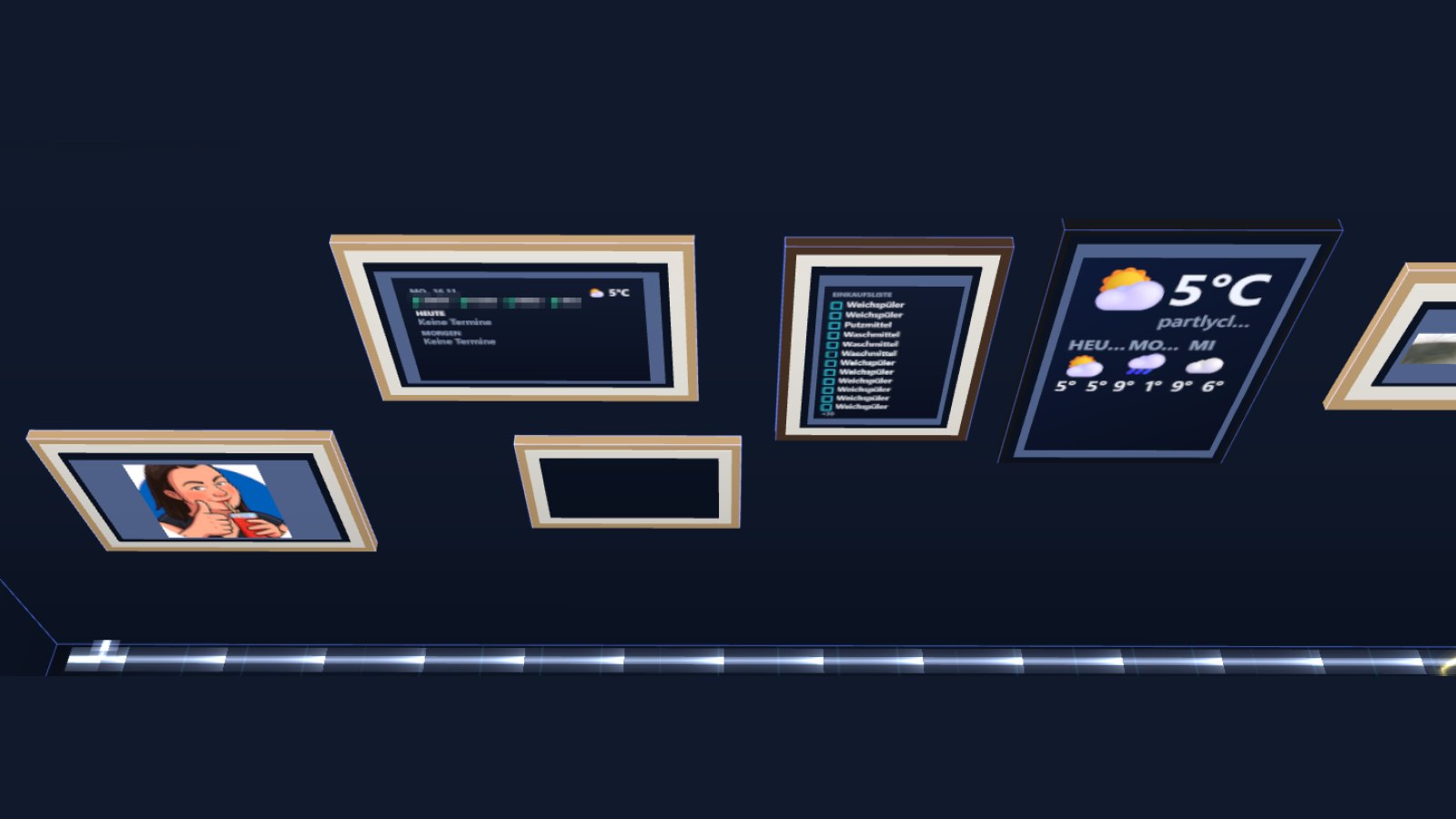
11 picture frames for NeonPlan 3D whose surface shows what is going on in your home – far more than a photo on the wall:
- Calendar: the next days on the frame, several calendars in their own colours, “now” and “in 20 min”, birthdays with 🎂, a reminder before appointments (a notice on the screen, with the Announcements module also spoken), and new appointments straight from the pop-up.
- Shopping / to-do list from Home Assistant – tick off and add items in the pop-up.
- Family board: today’s and tomorrow’s calendar, who is home, tomorrow’s bins (with Household Pro), weather.
- People: who is home, in which room (with room tracking), since when.
- Camera with a “doorbell frame”: pops up big for 30 seconds on a ring, motion or camera detection; live with Camera Cockpit.
- Music / TV (cover, with controls in the pop-up), person (picture from HA), photo slideshow (upload several photos or URLs), weather with a three-day forecast and rain warning.
A tap on the frame opens its content big in the middle of the 3D view.
Good to know: adding appointments works with calendars that allow writing (local calendar, Google with write access). The pack contains a module; after installing, approve it once under Extensions (like Heat Pro).
Included: 11 frames
- Frame portrait 30 × 40
- Frame portrait 40 × 55
- Frame portrait 50 × 70
- Frame landscape 40 × 30
- Frame landscape 60 × 40
- Frame landscape 80 × 55
- Square frame 50 × 50
- Poster frame 60 × 85
- Digital frame wall 40 × 25
- Digital frame standing 25 × 18
- Wooden stand frame 18 × 24
The digital photo frame from the Decor & Plants pack can show the same content once this pack is installed.
Requirements
- NeonPlan 3D 3.0.5 or newer (free from the Home Assistant Marketplace or HACS)
- From NeonPlan 3.0.6 the pack runs as a module: after the update, approve the module once under Extensions.
Licence
Buy once; your licence key unlocks the pack on up to three installations, updates included. Enter the key in NeonPlan 3D under Extensions › Shop connection. Included in the Supporter Pass.
Digitale Bilderrahmen – Rahmen, die leben
11 Bilderrahmen für NeonPlan 3D, deren Fläche zeigt, was bei dir zu Hause los ist – viel mehr als ein Foto an der Wand:
- Kalender: die nächsten Tage auf der Fläche, mehrere Kalender in eigenen Farben, „jetzt“ und „in 20 min“, Geburtstage mit 🎂, Erinnerung vor Terminen (Hinweis auf dem Bildschirm, mit dem Durchsagen-Modul auch gesprochen), neue Termine direkt aus dem Pop-up eintragen.
- Einkaufs- / To-do-Liste aus Home Assistant, im Pop-up abhaken und eintragen.
- Familienboard: Kalender heute und morgen, wer ist zuhause, Müll von morgen (mit Haushalt Pro), Wetter.
- Personen: wer ist zuhause, in welchem Raum (mit Ortung), seit wann.
- Kamera mit „Türklingel-Rahmen“: springt bei Klingel, Bewegung oder Kamera-Erkennung 30 Sekunden groß auf; mit Kamera-Cockpit live.
- Musik / Fernseher (Cover, mit Bedienung im Pop-up), Person (Bild aus HA), Foto-Diashow (mehrere Fotos hochladen oder URLs), Wetter mit drei Tagen Vorhersage und Regenwarnung.
Ein Tipp auf den Rahmen öffnet den Inhalt groß in der Mitte der 3D-Ansicht.
Gut zu wissen: Termine eintragen geht nur bei Kalendern, die schreiben dürfen (lokaler Kalender, Google mit Schreibrecht). Das Pack enthält ein Modul; nach dem Installieren einmal unter Erweiterungen freigeben (wie bei Wärme Pro).
Enthalten: 11 Rahmen
- Rahmen hoch 30 × 40
- Rahmen hoch 40 × 55
- Rahmen hoch 50 × 70
- Rahmen quer 40 × 30
- Rahmen quer 60 × 40
- Rahmen quer 80 × 55
- Rahmen quadratisch 50 × 50
- Posterrahmen 60 × 85
- Digitaler Rahmen Wand 40 × 25
- Digitaler Rahmen stehend 25 × 18
- Standrahmen Holz 18 × 24
Der digitale Bilderrahmen aus dem Pack Deko & Pflanzen kann denselben Inhalt zeigen, sobald dieses Pack installiert ist.
Voraussetzungen
- NeonPlan 3D ab 3.0.5 (kostenlos aus dem Marketplace in Home Assistant bzw. über HACS)
- Ab NeonPlan 3.0.6 läuft das Pack als Modul: Nach dem Update einmal unter Erweiterungen das Modul freigeben.
Lizenz
Einmal kaufen, dein Lizenzschlüssel schaltet das Pack auf bis zu drei Installationen frei, Updates inklusive. Den Schlüssel trägst du in NeonPlan 3D unter Erweiterungen › Shop-Verbindung ein. Im Supporter-Pass enthalten.


Rezensionen
Es gibt noch keine Rezensionen