Beschreibung
Sound & Cinema – the music in your 3D home
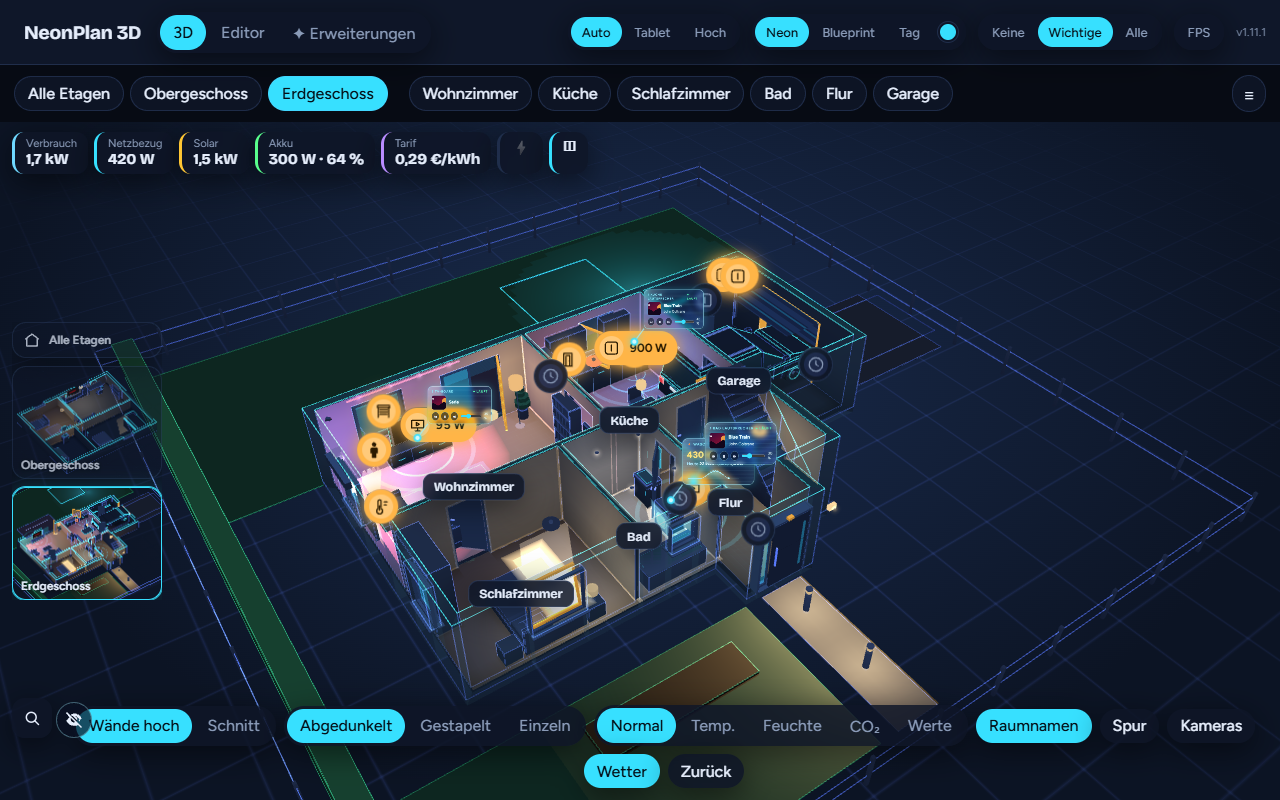
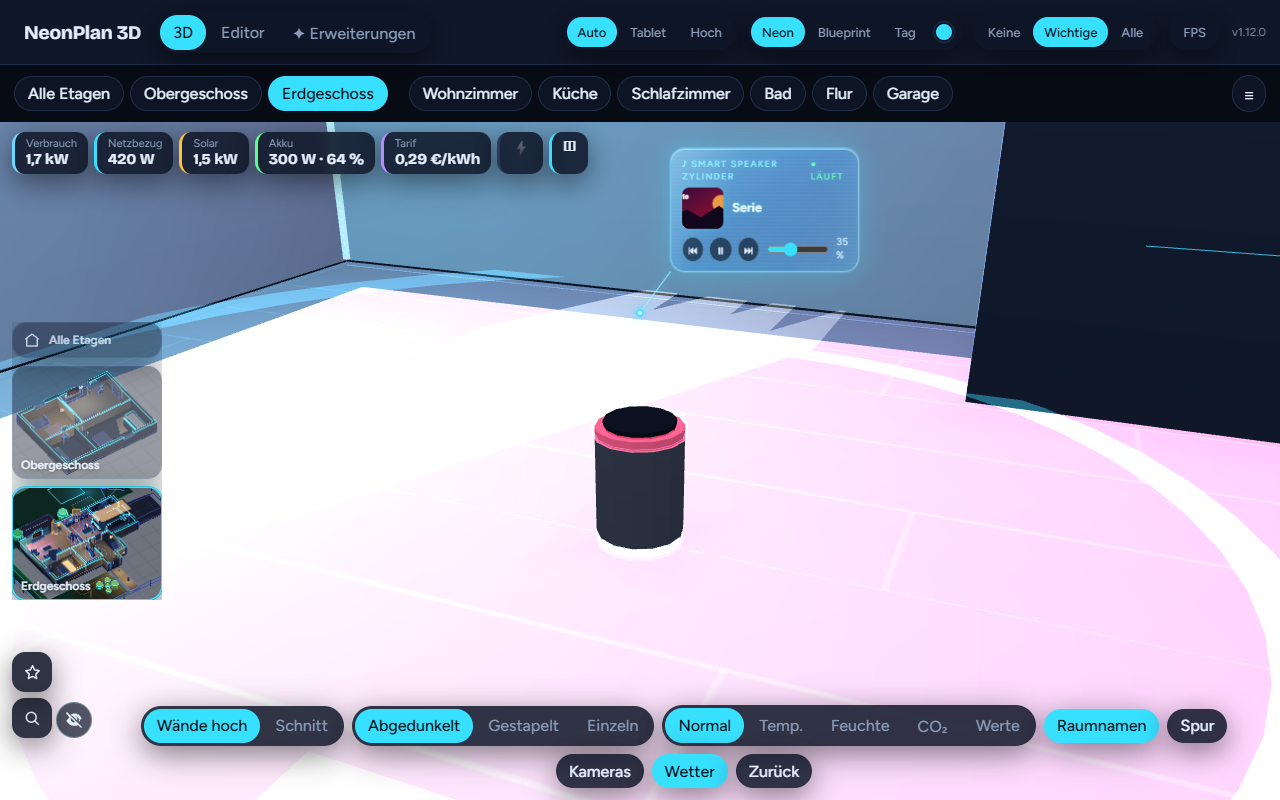
Speakers show what is playing: a glass card floats over every playing speaker with cover, title, artist and volume – previous, play/pause, next and a volume slider right on the card. Glowing sound rings travel over the floor around playing speakers, the louder the wider. Multiroom groups (Sonos, Home Assistant groups) are joined by glowing lines. And a media player’s quick menu gets cover, play/pause, track change and volume instead of on/off only.
From each speaker’s quick menu you start your stations and playlists (set in the editor) and pick the source. Smart speakers and displays from the Home Cinema & Hi-Fi pack light their ring in the colour of the running app, displays show the cover. While the card floats, the speaker’s pin steps aside.
Important for Amazon Echo (Alexa Media Player): play, pause and track change work. On many Echos the volume cannot be set through Alexa Media Player, or only with a delay – a limit of the unofficial Amazon interface, not of NeonPlan; Home Assistant’s own media player dialog cannot do it then either. Echos controlled through Music Assistant usually follow the volume reliably.
Works with every media player in Home Assistant: Sonos, HEOS, Bluesound, Chromecast, Apple TV, Spotify Connect, Music Assistant, Squeezebox, Denon, Yamaha … Speakers go into the plan as a device, or as furniture from the Home Cinema pack (floor-standing speaker, soundbar, ceiling speaker) with the media player as their device. Matching smart speakers and displays as furniture come with the Home Cinema & Hi-Fi pack.
Runs on old wall tablets too (rings at half the frame rate, cards without the glass effect). €5.90 once, up to three installations. Manual chapter 6.5.
Which speakers fit?
NeonPlan uses Home Assistant’s standard media player interface: what works in Home Assistant’s media player dialog works here too. This is an assessment from documentation and experience, not a guarantee for every model:
| Integration | Cover and title | Volume | Multiroom lines |
|---|---|---|---|
| Sonos | yes | yes, local | yes |
| Music Assistant (every player, Echos too) | yes | yes | yes |
| Denon/Marantz HEOS, Yamaha MusicCast, Bluesound, Squeezebox/Lyrion | yes | yes | yes |
| Google Cast (Nest Audio, Nest Hub, Chromecast) | yes | yes | mostly not |
| Apple TV / HomePod | yes | depends on the model | no |
| TVs and AV receivers | depends on the app | yes | no |
| Amazon Echo through Alexa Media Player | yes | often not, or delayed | no |
What a player should bring: the state playing/paused, media_title and media_artist (else the card shows the app or source), entity_picture for the cover, volume_level for the slider and rings, group_members for the lines.
Requirements
- NeonPlan 3D 1.12.0 or newer (free via HACS)
- Home Assistant 2025.1 or newer
- Media players in Home Assistant
- NeonPlan 3D runs in 16 languages: German, English, French, Spanish, Dutch, Italian, Hungarian, Danish, Swedish, Norwegian (Bokmål and Nynorsk), Finnish, Czech, Polish, Romanian and Slovenian
Licence
Buy once; your licence key unlocks Sound & Cinema on up to three installations. No running costs, keeps working without internet. Enter the key in NeonPlan 3D under Extensions › Shop connection. Questions: GitHub issue or discussion in the repo, we answer quickly.
Klang & Kino – die Musik im 3D-Haus
Lautsprecher zeigen, was gerade läuft: Über jedem spielenden Lautsprecher schwebt eine Glaskarte mit Cover, Titel, Interpret und Lautstärke – mit Zurück, Abspielen/Pause, Weiter und Lautstärkeregler direkt auf der Karte. Leuchtende Schallringe wandern um spielende Lautsprecher über den Boden, je lauter, desto weiter. Multiroom-Gruppen (Sonos, Home-Assistant-Gruppen) sind durch leuchtende Linien verbunden. Und das Schnellmenü eines Media Players bekommt Cover, Abspielen/Pause, Titelwechsel und Lautstärke statt nur An/Aus.
Im Schnellmenü jedes Lautsprechers startest du deine Sender und Playlists (im Editor angelegt) und wählst die Quelle. Smart Speaker und Displays aus dem Pack Heimkino & Hi-Fi leuchten mit ihrem Lichtring in der Farbe der laufenden App, Displays zeigen das Cover. Solange die Karte schwebt, tritt der Pin des Lautsprechers zur Seite.
Wichtig für Amazon Echo (Alexa Media Player): Abspielen, Pause und Titelwechsel funktionieren. Die Lautstärke lässt sich bei vielen Echos über Alexa Media Player nicht oder nur verzögert einstellen – das ist eine Grenze der inoffiziellen Amazon-Schnittstelle, nicht von NeonPlan; auch das Media-Player-Fenster von Home Assistant kann es dann nicht. Echos über Music Assistant folgen der Lautstärke meist zuverlässig.
Funktioniert mit jedem Media Player in Home Assistant: Sonos, HEOS, Bluesound, Chromecast, Apple TV, Spotify Connect, Music Assistant, Squeezebox, Denon, Yamaha … Lautsprecher kommen als Gerät in den Plan oder als Möbel aus dem Heimkino-Pack (Standlautsprecher, Soundbar, Deckenlautsprecher) mit dem Media Player als Gerät. Passende Smart Speaker und Displays als Möbel gibt es im Pack Heimkino & Hi-Fi.
Läuft auch auf alten Wandtablets (Ringe mit halber Bildrate, Karten ohne Glaseffekt). Einmal 5,90 €, bis zu drei Installationen. Anleitung Kapitel 6.5.
Welche Lautsprecher passen?
NeonPlan nutzt die Standard-Schnittstelle der Media Player von Home Assistant: Was im Media-Player-Fenster von Home Assistant geht, geht auch hier. Das ist eine Einschätzung nach Dokumentation und Erfahrungen, keine Garantie für jedes Modell:
| Integration | Cover und Titel | Lautstärke | Multiroom-Linien |
|---|---|---|---|
| Sonos | ja | ja, lokal | ja |
| Music Assistant (alle Player, auch Echos) | ja | ja | ja |
| Denon/Marantz HEOS, Yamaha MusicCast, Bluesound, Squeezebox/Lyrion | ja | ja | ja |
| Google Cast (Nest Audio, Nest Hub, Chromecast) | ja | ja | meist nicht |
| Apple TV / HomePod | ja | je nach Modell | nein |
| Fernseher und AV-Receiver | je nach App | ja | nein |
| Amazon Echo über Alexa Media Player | ja | oft nicht oder verzögert | nein |
Was ein Player mitbringen sollte: den Zustand playing/paused, media_title und media_artist (sonst zeigt die Karte App oder Quelle), entity_picture für das Cover, volume_level für Regler und Ringe, group_members für die Linien.
Voraussetzungen
- NeonPlan 3D ab Version 1.12.0 (kostenlos über HACS)
- Home Assistant ab 2025.1
- Media Player in Home Assistant
- NeonPlan 3D läuft in 16 Sprachen: Deutsch, Englisch, Französisch, Spanisch, Niederländisch, Italienisch, Ungarisch, Dänisch, Schwedisch, Norwegisch (Bokmål und Nynorsk), Finnisch, Tschechisch, Polnisch, Rumänisch und Slowenisch
Lizenz
Einmal kaufen, dein Lizenzschlüssel schaltet Klang & Kino auf bis zu drei Installationen frei. Keine laufenden Kosten, funktioniert auch ohne Internet weiter. Den Schlüssel trägst du in NeonPlan 3D unter Erweiterungen › Shop-Verbindung ein. Bei Fragen: GitHub-Issue oder Diskussion im Repo, wir antworten schnell.

Rezensionen
Es gibt noch keine Rezensionen